Live event photo sharing, straight from your camera.
SnapMila connects your camera's built-in FTP transfer to a live gallery. Guests scan one QR and see, then save, every photo in full quality — at weddings, conferences, launches and parties. No cables, no Drive links, no waiting till next week.
- Uses your camera's built-in FTP
- Guests need no app
- Originals stay untouched
How it works
Set up once. Then just shoot.
No new hardware and no laptop at the venue. Your camera already knows how to send photos — SnapMila gives it somewhere worth sending them.
- 1
Create the event
Name the event in the app. Its QR is ready at once — print it on table cards, standees or the stage screen before the first photo is taken.
- 2
Point your camera at SnapMila
Enter the server and your Gmail in the camera's FTP settings once. For each event, change only a 6-character password.
Nikon Z50 II setup, step by step → - 3
Guests scan, see, save
Every shot lands in a live gallery. Guests open it with the QR and save any photo in full quality.
In the app
Everything the photographer needs on one phone
Create the event, print its QR, watch photos arrive and see at once if anything is missing.
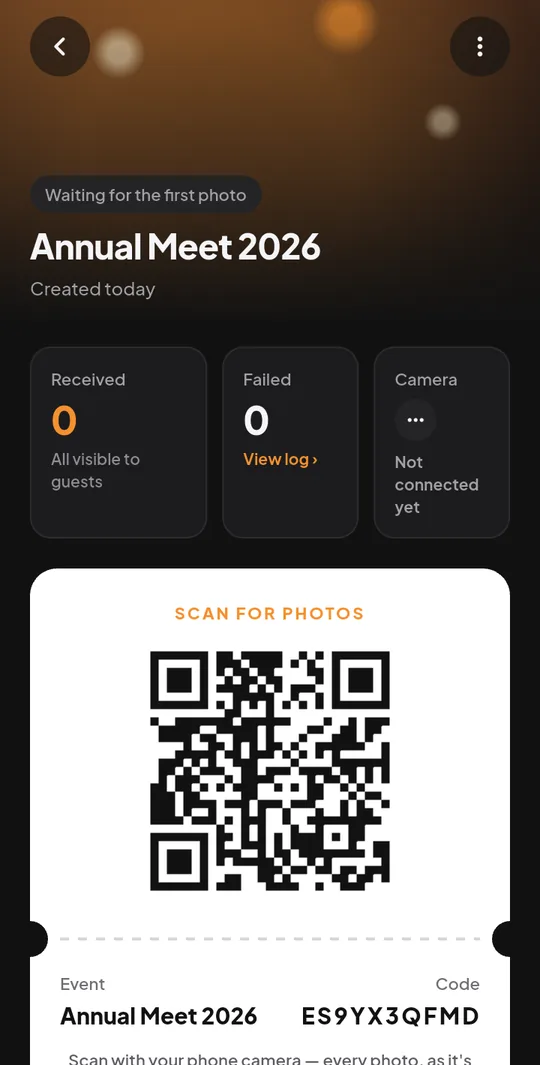
The QR is ready the moment you create the event.
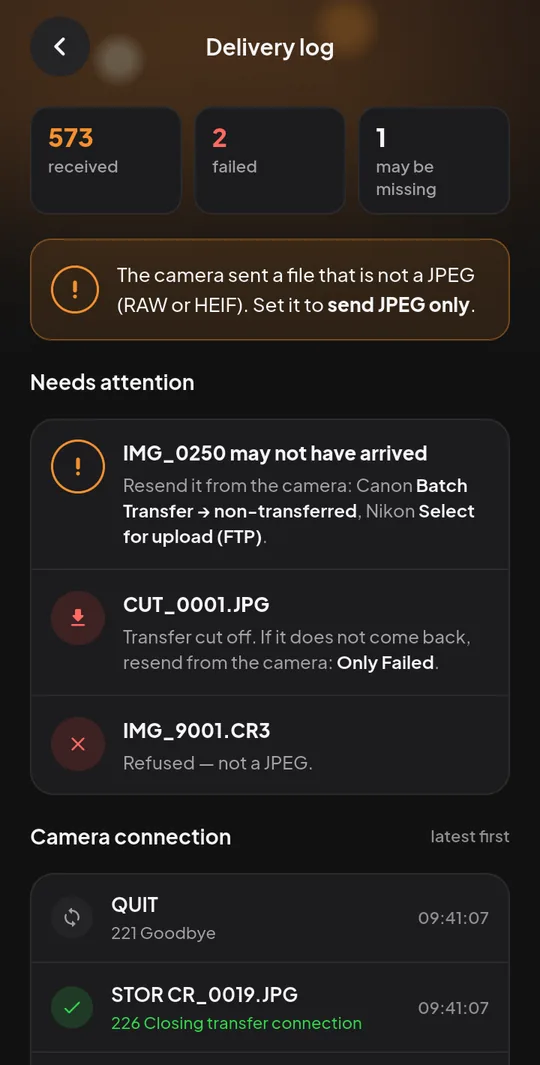
The delivery log names any file that did not arrive.
Features
Built for the way live events actually run
A gallery that fills itself
New photos appear for guests within about half a minute of the shot, newest first.
Full-quality downloads
Guests browse light previews and save the original exactly as your camera sent it.
Hide any photo, any time
A blink, a closed-door slide or an awkward moment? Hide it from guests in one tap — and show it again later in its place.
Never lose a shot quietly
Cut transfers are asked for again, and gaps in your file numbers are named, so you know exactly what to resend.
Venue Wi-Fi or your hotspot
Works over any connection your camera can join. No laptop or extra box at the venue.
Private by design
Only people with the QR or link can open a gallery, and galleries are kept out of search engines.
Who it's for
One live gallery, many kinds of events
The camera, the QR and the gallery work the same everywhere. What changes is who is waiting for the photos.
Event photographers
Deliver while you shoot, not a week later. Your camera does the sending.
How it works for event photographersEvent managers
Give guests and clients photos during the event, with one QR on every table.
How it works for event managersCorporate events
Conferences, launches and offsites — photos ready for social posts before the closing talk.
How it works for corporate eventsWeddings
Every function, every relative, every phone — including the family watching from abroad.
How it works for weddings
For guests
No app. No sign-up. Just scan.
Guests point their phone camera at the QR and the gallery opens in the browser. The SnapMila app is there for anyone who wants it — never required.
- 1Scan the QR at the venue
- 2Watch new photos arrive on their own
- 3Save any photo in full quality
FAQ
Questions photographers ask
Which events is SnapMila for?
Any event with a photographer: weddings, conferences, product launches, corporate offsites, college fests and parties. One event in the app gives one QR and one live gallery.
Which cameras work with SnapMila?
Any camera with FTP (or FTPS) transfer over Wi-Fi. You enter the server, your Gmail and the event's password in the camera's FTP settings — the camera does the rest.
Do guests need to install an app?
No. The QR opens the gallery in any phone browser. The app is optional.
Are the photos private?
A gallery opens only with its QR or link, and search engines are told not to list it. You can hide any photo from guests at any time.
What happens if the Wi-Fi drops?
Switch the camera to your phone's hotspot. Anything that did not arrive is named in the app, so you can resend it with the camera's own upload menu.
How much does SnapMila cost?
SnapMila is free while it is in beta. If paid plans come later, their prices will be published here and shown in the app before any charge applies.
Can guests find their own photos with a selfie?
Not yet. Face search is planned; until it ships, guests browse newest first. You can join the waitlist on the face search page.
Does SnapMila change my photos?
Never. The original stays exactly as the camera sent it; guests see a lighter copy while browsing and download the original.
Your next event, live.
Download SnapMila, create the event and print the QR. That is the whole setup.